A glass storefront can keep its daylight and still carry a moving image. That promise makes a Transparent Led Display appealing, but brightness alone cannot predict performance. Buyers must consider viewing distance, transparency, pixel pitch, ambient light, and the building’s glass structure. Small choices matter. A sample that looks vivid in a dark showroom may appear faint beside a sunlit street.
The wider digital signage market offers useful context, though it is not a measure of transparent LED sales. Grand View Research estimated the global digital signage market at USD 28.83 billion in 2023, with projected annual growth of 8.1% from 2024 to 2030. This signals sustained investment in visual communication, not guaranteed returns for any installation. Market growth cannot replace a site survey.
For global buyers, procurement also means checking more than the panel specification. Ask for measured brightness, power consumption, refresh rate, service access, warranty terms, and spare-parts availability. Request operating footage under lighting conditions similar to your site. Confirm how mounting, ventilation, and content control will work before approving a purchase. So does proof. A supplier’s claims deserve independent verification. Even careful comparisons leave uncertainty; transparent displays vary by design, installation, and viewing conditions. These seven buying tips help turn broad promises into practical questions, so teams can compare suppliers with clearer evidence and fewer costly surprises.
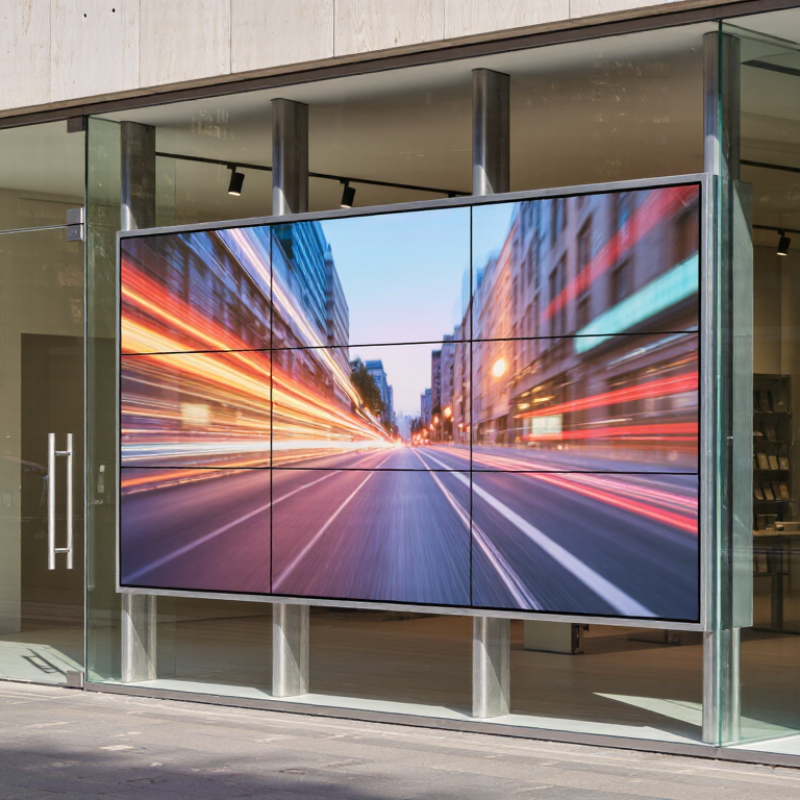
Transparent LED displays are not simply ordinary panels with gaps. They use LED strips or modules arranged on a clear support, leaving open areas for daylight and sightlines. LED chips create the image, while driver circuitry controls when each pixel lights and how brightly. A receiving card and control system process content signals; a power supply delivers stable current. Small components, large consequences.
The supporting structure matters too. Depending on the design, modules may attach to glass-facing frames, aluminum profiles, or custom rails. Check how these parts handle heat, cable routing, and service access. A neat sample can hide awkward maintenance. Ask to inspect the rear side, not just the lit face.
Two specifications need context: pixel pitch and transparency. A tighter pitch can show finer detail at close viewing distances, but it may reduce open area and increase cost. Transparency is not a fixed result; LED spacing, module layout, and viewing angle affect what people see through the screen. Brightness should suit ambient light, especially on sunlit façades, without overpowering the scene at night. There is no perfect setting. Compare a sample at the actual viewing distance, and test content with thin lines and small text. It can look different outdoors.
Transparent LED displays should be selected for the space they serve, not just by pixel pitch. Measure viewing distance, opening width, ceiling height, and ambient light at different times. A bright showroom window may wash out a screen at noon. At night, the same setting can feel harsh. Small details matter.
Tips: Match pixel pitch to the closest normal viewing point, then test sample content from there. Check the transparency ratio against daylight and visibility needs. Ask for brightness and refresh-rate data, but assess them with moving video, not a static chart. Confirm access for power, signal routing, and maintenance. That part gets missed.
Before ordering, request a site-specific mock-up or small working section. Compare white text, skin tones, and fine lines in daylight and after dark. Check how panels connect around corners and how replacement modules are handled. Leave room for structural tolerances; buildings are rarely perfectly square. I would not finalize a purchase from a brochure alone. Installation details can still change the result.
Transparent LED displays must be judged in their real setting, not only in a dark showroom. Compare pixel pitch, peak brightness, transparency ratio, and refresh rate across the same test conditions. A tight pitch can sharpen close-up text, but may add cost and power draw. Check it at noon. Measure viewing distance from the nearest seat and inspect content through the glass, with daylight behind it.
Brightness figures alone can mislead. Ask for typical operating brightness, maximum power per square metre, and measured consumption at your planned content level. The U.S. Department of Energy reports that LED lighting uses at least 75% less energy than incandescent lighting; that figure does not predict a display’s savings. Treat it as context, then request a display-specific kWh test. Check it at noon. Also confirm whether ventilation, ambient light sensors, and control settings affect the quoted load.
The International Energy Agency’s Energy Efficiency 2023 report identifies efficiency improvements as important to limiting energy demand, but procurement decisions still need site data. Compare samples against the actual glass, sun angle, and viewing distance. Check contrast with white text and dark imagery, not just vivid demo footage. Ask vendors to document test settings. A neat specification sheet can still leave gaps; buyers should record operating hours and acceptable brightness before comparing quotations.
Transparent LED displays can look effortless in a showroom and behave differently behind a sunlit glass façade. Compare manufacturers using measured brightness, transparency, pixel pitch, and viewing distance—not renderings alone. AVIXA’s 2024 Industry Outlook projects global professional audiovisual revenue to reach about $325 billion by 2029, reflecting a broad, expanding market. That figure is not a quality rating. Ask suppliers for test methods, dated reports, and references from installations in similar climates.
Tip: Request a sample panel and run it beside glass in daylight. Check image uniformity, reflections, heat, and access to the power supply. For warranties, get the coverage period and exclusions in writing. Clarify whether labor, shipping, replacement modules, and on-site service are included. A long warranty can still leave you waiting for parts.
For global support, ask who handles commissioning, local-language troubleshooting, and urgent failures in your region. Request typical response times, spare-parts locations, and a written escalation path. Confirm that remote diagnostics work with your network and that service staff can reach the site. Keep the answers. They may be less polished than a brochure, but that is useful. A supplier’s support plan should name actual people and practical steps, not just promise “worldwide service.”
| Tip | What to Evaluate | Useful Questions and Data | Evidence to Request | Buyer Check |
|---|---|---|---|---|
| 1. Match transparency to the installation | Transparency, viewing distance, and visual obstruction | Ask how transparency is measured and whether the quoted figure applies to the complete display assembly. Open-area ratios around 60%–90% are available across different designs; higher transparency can involve trade-offs in pixel density and visual impact. | A sample panel, measurement method, and a mock-up or viewing test from the intended distance | Assess visibility from both sides and in the actual lighting conditions; do not compare transparency figures unless they use the same method. |
| 2. Verify pixel pitch and image quality | Pixel pitch, resolution, viewing distance, and content type | Pixel pitch is the distance between adjacent pixel centers, measured in millimetres. A smaller pitch can provide finer detail, but the suitable choice depends on viewing distance, display size, and content. | Pixel-pitch specification, native resolution for the proposed dimensions, and a demonstration using your content | Check small text, gradients, and moving images at the expected viewing distance rather than judging from a close-up photo. |
| 3. Compare brightness and ambient-light performance | Brightness, daylight readability, and adjustment controls | Brightness is commonly specified in nits (cd/m²). Outdoor-facing applications may require several thousand nits, but the suitable level depends on direct sunlight, glazing, content, and local requirements. Confirm whether the figure is a maximum or typical operating value. | Brightness test conditions, dimming range, sensor or control options, and power data at the stated operating level | Evaluate the display under representative lighting and consider energy use, heat, and brightness limits for the site. |
| 4. Assess the manufacturer’s quality process | Production controls, traceability, testing, and consistency | Ask how LED modules and finished panels are inspected, how serial numbers are tracked, and what burn-in or functional tests are performed. Verify that any claimed quality-management certification is current and covers the relevant manufacturing site. | Factory or process audit information, sample inspection records, test procedures, and applicable certificates | Confirm that the sample, production units, spare parts, and replacement modules use compatible specifications and calibration procedures. |
| 5. Read the warranty terms in detail | Warranty duration, coverage, exclusions, and remedies | Warranty periods and conditions vary by supplier and contract. Clarify when coverage begins, which components are covered, how dead pixels are assessed, and whether labour, shipping, customs charges, or on-site service are included. | The full warranty document, dead-pixel policy, claim process, and written repair or replacement timelines | Check exclusions for installation, environmental conditions, power quality, and unauthorized repairs; obtain all agreed terms in writing. |
| 6. Confirm global support and spare-parts access | Time zones, response channels, local service, and parts logistics | Ask which languages and support hours are available, how urgent cases are escalated, and whether trained technicians or service partners can reach the installation region. Confirm spare-parts availability and shipping arrangements. | Support contact details, escalation procedure, regional service coverage, spare-parts list, and lead-time estimates | Agree on response and resolution targets, parts responsibility, shipping terms, and remote troubleshooting requirements before ordering. |
| 7. Check compliance, installation, and total cost | Applicable regulations, mounting, operating environment, and lifecycle costs | Requirements depend on the destination market and installation. Ask for applicable safety and electromagnetic-compatibility documentation, confirm the intended indoor or outdoor use, and review structural loads, ventilation, power, and control-system compatibility. | Destination-market compliance documents, installation drawings, power specifications, maintenance guidance, and a complete quotation | Compare the delivered and installed cost, including freight, duties, mounting, commissioning, energy, maintenance, and replacement parts. |
Note: Performance figures and service terms depend on the specific design, project conditions, destination market, and written contract. Verify all specifications and compliance requirements for the intended installation.
Tip: Plan the installation around the building, not just the display. Measure the glass area, viewing distance, and available support points before choosing a panel layout. Check where power and signal cables will run, and leave access for ventilation and service. Measure twice. Check again. A clear drawing helps installers spot awkward gaps, though site conditions can still differ from the plan.
Tip: Treat safety as part of the specification. Confirm that the mounting structure can carry the display and withstand expected wind or vibration. Ask a qualified installer to review fixings, electrical connections, and cable protection. For outdoor locations, check the display’s environmental rating against rain, dust, and temperature exposure. Keep access routes clear. Do not assume glass alone can support the load; that detail is easy to miss.
Tip: Plan maintenance before commissioning. Make sure technicians can reach power supplies and modules without damaging nearby finishes. Keep suitable spare parts, installation records, and a simple fault log. Clean surfaces only as directed for the display, with power isolated when required. Regular checks can reveal loose connections or uneven brightness early. Still, maintenance schedules need adjustment to local dust, heat, and operating hours. A calendar reminder is useful, but it is not a substitute for inspection.
Example baseline for planning inspections and upkeep. Adjust the schedule for site conditions, local safety requirements, and the display manufacturer’s guidance.